By SVZ · Guidance checked October 21, 2026
Short answer
If your WordPress site runs an affected PHP version, its PHP runtime needs patching. Updating WordPress, a theme, or a plugin alone does not fix PHP2Shell. Ask your hosting provider to confirm the patched package is running across production, staging, and any other exposed PHP environments.
The two vulnerabilities, CVE-2026-109618 and CVE-2026-109619, can allow an unauthenticated attacker to execute code on a vulnerable server. PHP released fixes on October 21, 2026. Read the official PHP advisory.
Once the immediate exposure is addressed, there is a separate decision: does your marketing website still need a WordPress-and-PHP stack? Webflow can remove that customer-managed stack from a standard hosted marketing site. It cannot remove every security risk, and moving the front end does not secure a PHP backend you leave running.
The 48-second overview
Sound-off explainer. The written guidance and source links follow.
Video transcript: A WordPress update is not the PHP fix. Patch the runtime to PHP 8.5.12, 8.4.27, 8.3.36 or 8.2.35, or use verified vendor backports for both CVEs. Ask your host for the running version, confirmation workers were updated, and coverage of every origin. A plugin or WAF is not the PHP patch. Standard Webflow hosting changes the maintenance boundary; connected PHP services still need patching. Patch first. Migrate deliberately. Guidance checked October 21, 2026.
What is PHP2Shell?
PHP2Shell is the name being used for two critical vulnerabilities in the PHP runtime. One concerns memory corruption during out-of-memory handling; the other concerns stale request state after memory has been freed. Both can permit unauthenticated remote code execution. They are runtime vulnerabilities, not defects in a particular WordPress plugin. Sources: PHP; Cloudflare.
PHP identifies installations serving web requests as at risk, including PHP-FPM, Apache with mod_php, php-cgi, FrankenPHP, and LiteSpeed. The project identifies mod_php as the highest-risk setup, with a demonstrated attack that can trigger before application code runs.
That last detail matters. A fix that depends on WordPress code running first is not an adequate substitute for the runtime patch.
Cloudflare reports observing attack traffic and deploying WAF protections. CERT-EU recommends immediate patching, or considering isolation of internet-facing applications when the fix cannot promptly be applied and verified.
None of this establishes that every PHP site has been breached. Nor does a precautionary shutdown establish a compromise. Exposure, attempted exploitation, and a confirmed breach are different findings.
Is my WordPress website affected?
WordPress relies on PHP, so an unpatched PHP environment running WordPress needs attention. The relevant evidence is the actual runtime and vendor patch status, not whether the WordPress dashboard says everything is up to date. WordPress’s server requirements confirm PHP is part of the underlying stack.
Ask whoever operates your host to check:
- The PHP environment actually serving production requests.
- Every staging site, old campaign site, secondary origin, and legacy installation still reachable.
- The exact package revision and whether it includes fixes for both CVEs.
- Any additional PHP services behind the main website, such as custom form handlers or applications.
Do not publish a public phpinfo() page or run exploit demonstrations against production to answer this question. Use your hosting provider’s authenticated controls and the responsible technical team.
Which PHP versions contain the fix?
The PHP project’s October 21 security releases are listed below. These are the first fixed releases announced for these supported branches. Later releases may also contain the fixes.
| PHP branch |
October 21 fixed release |
| 8.5 |
8.5.12 |
| 8.4 |
8.4.27 |
| 8.3 |
8.3.36 |
| 8.2 |
8.2.35 |
Use the relevant fixed release, a later release containing the fixes, or a vendor/distribution package with verified backports for both vulnerabilities. Backported packages can retain an older-looking upstream version number; confirm the vendor advisory and package revision rather than rejecting or accepting a version string alone. Source: PHP security advisory.
PHP 8.1 and older are outside the project’s normal security support. Exceptional minimal source backports for PHP 7.4, 8.0, and 8.1 do not restore normal support. Ask your host about a supported upgrade path or its documented maintenance arrangement.
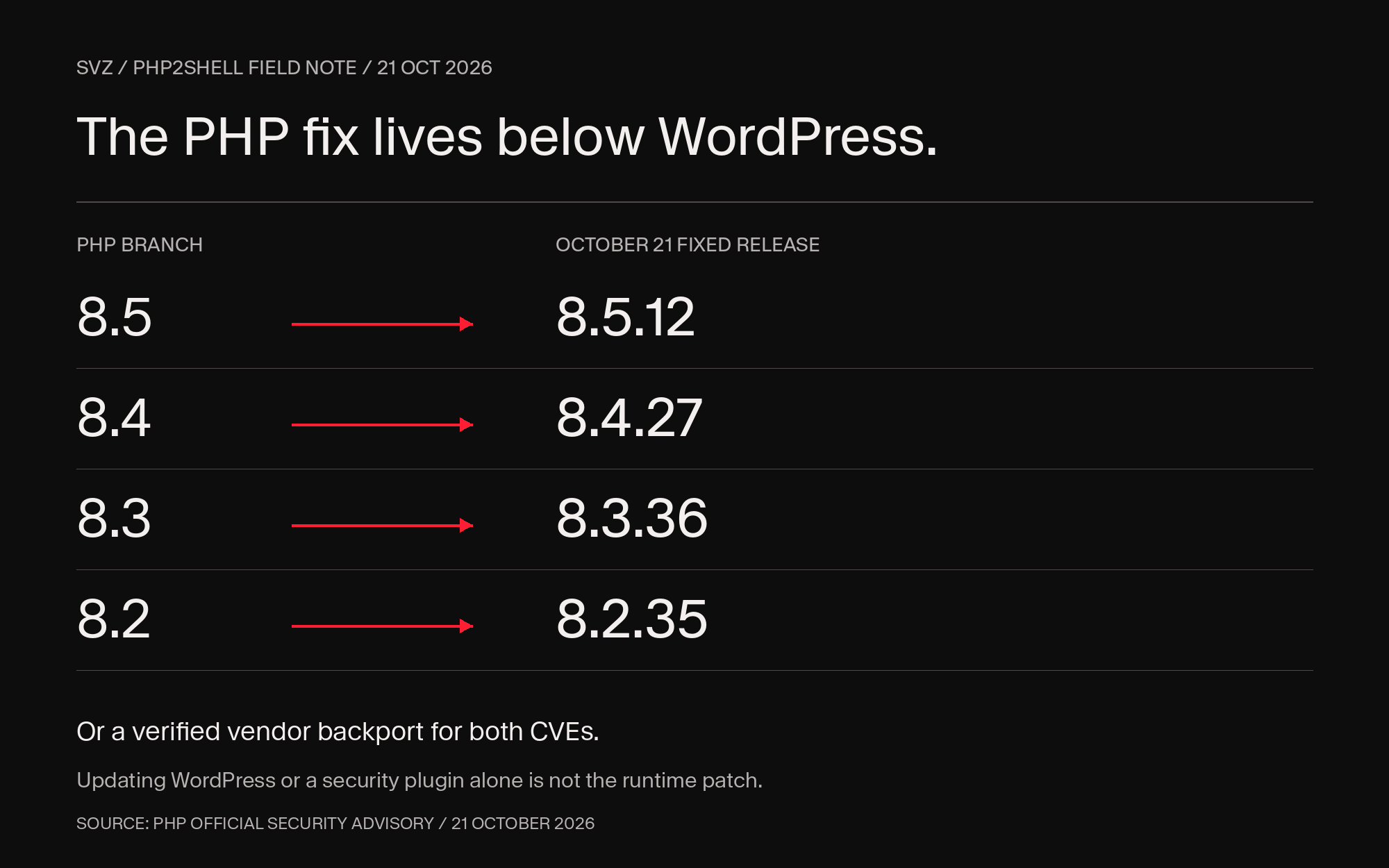 October 21, 2026 fixed PHP releases: branch 8.5 to 8.5.12; 8.4 to 8.4.27; 8.3 to 8.3.36; 8.2 to 8.2.35. Verified vendor backports may also apply.
What should I ask my hosting provider to do?
1. Patch the runtime
Have the host apply the appropriate PHP fix to every affected environment. Updating a WordPress plugin, switching themes, or enabling a firewall rule is not the same task.
2. Verify the deployed version
Ask for confirmation that the patched package is serving requests, with workers restarted or redeployed as required. Downloading or installing a package does not establish that all running processes have been replaced.
Test the journeys that matter after deployment: lead forms, site search, sign-in where applicable, checkout, and integration delivery.
3. Record coverage and evidence
Use one patch receipt per environment so your team can see what changed, who verified it, and what remains outstanding.
PHP2Shell patch receipt
- Environment: domain/origin, production or staging, and responsible owner.
- Fix: running PHP version, package revision, and vendor advisory covering both CVEs.
- Deployment: completion time and required worker restart/redeployment confirmation.
- Verification: critical journeys tested, verifier, and verification time.
- Exceptions: remaining exposed services, containment decision, and next owner.
- Investigation: who is reviewing relevant logs and potential compromise indicators.
The receipt is useful because “we updated it” is otherwise ambiguous: which environment, which package, and which running workers?
Copy-paste request for your host:
Please confirm whether every PHP environment serving our production and staging websites is patched for CVE-2026-109618 and CVE-2026-109619. Please provide the running PHP version or vendor package revision, the advisory confirming both fixes, deployment completion time, and confirmation that affected workers were restarted or redeployed where necessary. Please identify any remaining exposed environments and who is reviewing potential exploitation indicators.
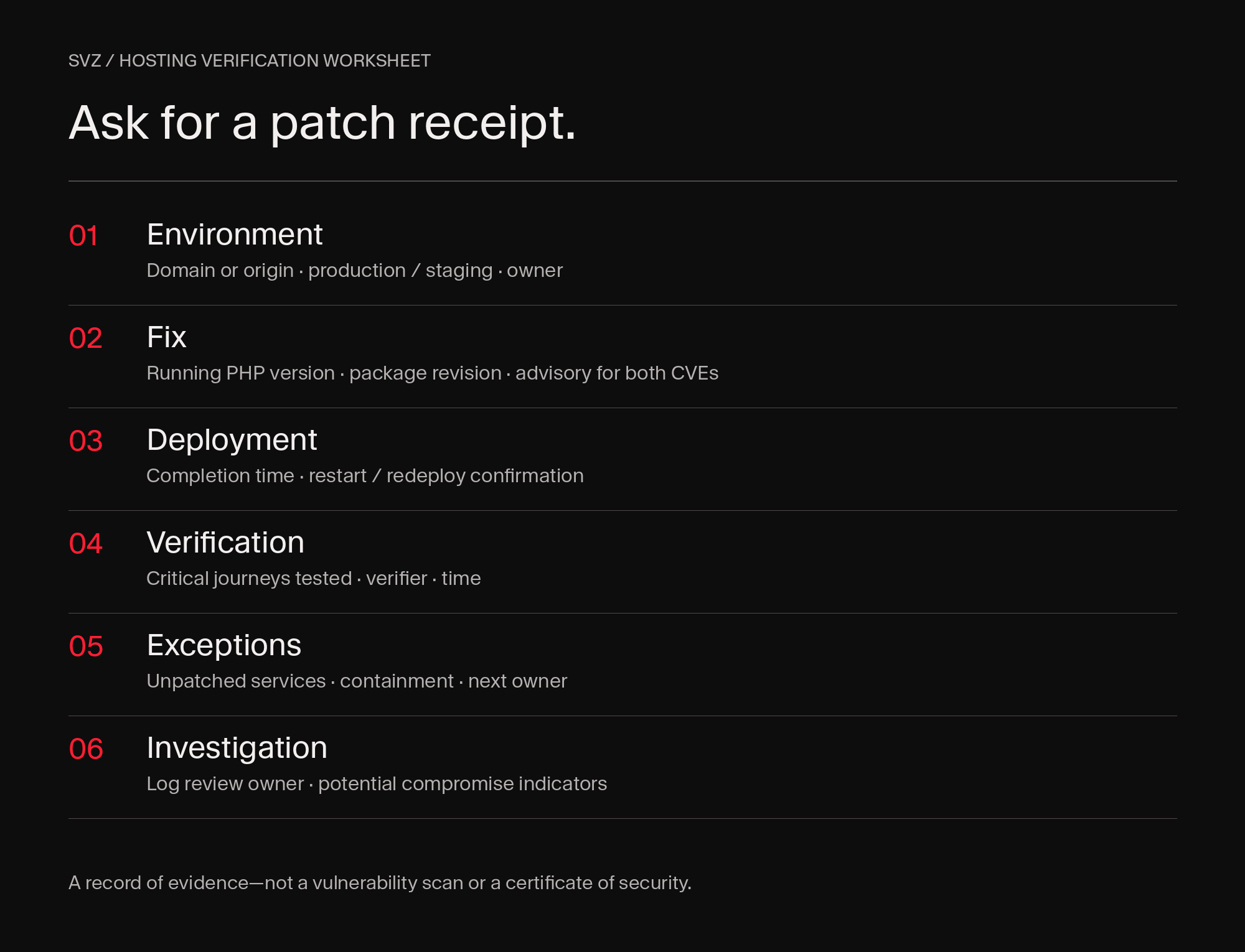 Six fields to request from a hosting provider: environment, fix, deployment, verification, exceptions and investigation ownership.
Download the blank patch-receipt worksheet (CSV)
Are Cloudflare or security plugins enough?
No. Neither replaces the PHP update. Cloudflare says to patch PHP even with its WAF protections enabled. PHP says its temporary mitigations reduce exposure to specific attack paths but do not make an installation safe. Sources: Cloudflare, PHP.
Keep appropriate protective controls in place while patching. If a prompt fix is not possible, ask your host and security team about containment, including CERT-EU’s guidance to consider isolating affected internet-facing applications until the fix is applied and verified. A WordPress “maintenance mode” page does not by itself establish that the vulnerable runtime is isolated.
Patching and incident response are also separate. If there are signs of compromise, investigate them. A successful update does not prove that nobody accessed the server earlier, and a platform migration is not malware cleanup.
Does Webflow avoid this WordPress/PHP maintenance problem?
A standard Webflow-hosted marketing site does not require your team to operate WordPress or maintain its PHP runtime. Webflow’s standard custom-code and embed surfaces do not execute PHP. Webflow describes its managed platform as providing platform-managed patches, HTTPS, DDoS protection, and access controls.
That changes who carries the maintenance work. It does not prove every service in a Webflow-connected architecture is unaffected by these CVEs.
| Responsibility |
WordPress deployment |
Standard Webflow hosting |
| CMS, themes, plugins |
Your team and/or managed provider maintain the installed stack |
Webflow maintains its hosted platform; review any apps and integrations you add |
| WordPress PHP runtime |
Host or infrastructure owner patches it |
No customer-operated WordPress/PHP runtime is required for the hosted site |
| Accounts and permissions |
Your organization still owns access hygiene |
Your organization still owns access hygiene |
| External PHP services |
Inventory and patch them |
Inventory and patch them; changing the front end does not remove them |
Managed WordPress providers can take on substantial maintenance work. Confirm how your hosting contract divides those responsibilities.
Review connected PHP services, Webflow Cloud applications and custom backends separately. A change to standard site hosting does not patch those dependencies.
The case for Webflow is narrower and more useful than “it cannot be hacked”: fewer customer-managed components and a clearer boundary between platform maintenance and your team’s responsibilities.
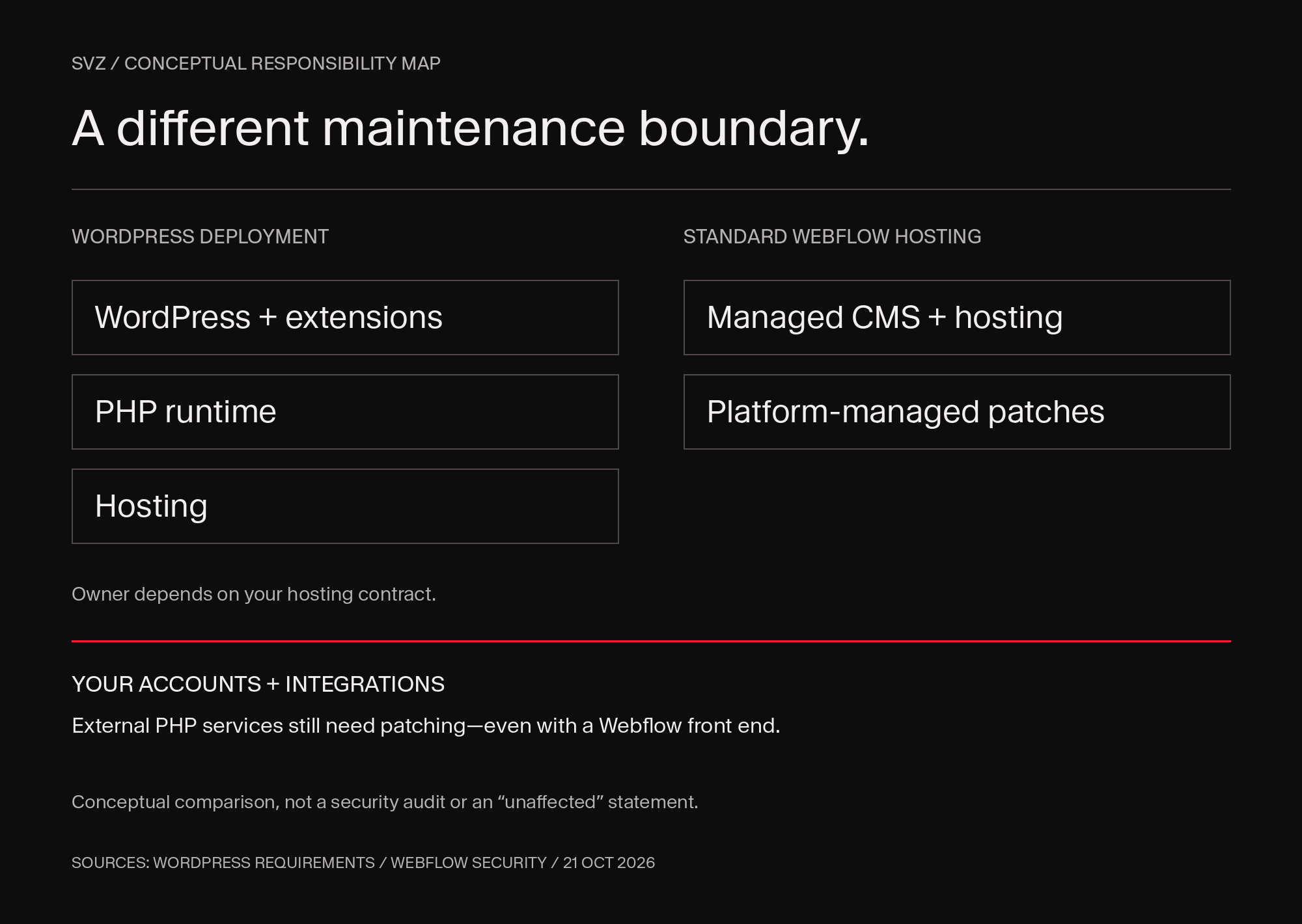 Conceptual comparison of WordPress and standard Webflow hosting responsibilities. Accounts and integrations remain the site owner’s responsibility; external PHP services still need patching.
When should a WordPress team consider moving to Webflow?
Our recommendation is to evaluate Webflow when a marketing-led site consisting of product pages, landing pages, resources, case studies, and lead forms requires more maintenance coordination than its business requirements justify.
Useful signals include:
- Routine security updates repeatedly interrupt campaign work.
- Hosting and runtime ownership are unclear.
- Plugins supply capabilities a managed platform can provide directly.
- Ordinary content and design changes require disproportionate engineering support.
WordPress can still be the right choice. A well-operated managed deployment is not equivalent to an abandoned installation. Heavy WooCommerce use, custom PHP business logic, memberships, or specialized publishing requirements can make migration more complex. Map those requirements before choosing a replacement.
For a broader comparison, read our guide to Webflow versus other platforms.
What does a responsible migration include?
A migration is a planned change, not today’s emergency patch.
- Stabilize first. Patch and assess the existing environment.
- Inventory dependencies. Content, plugins, forms, integrations, user workflows, and data flows.
- Protect discoverability. Map URLs, redirects, metadata, internal links, and important content.
- Test the replacement. Validate responsive behavior, accessibility, forms, analytics, consent, and integration handling.
- Control the cutover. Document DNS changes, rollback, and post-launch checks.
- Retire the old origin. Securely decommission the WordPress/PHP environment after retention and rollback requirements are satisfied.
Changing DNS does not necessarily make the old server unreachable. If it remains exposed, its PHP maintenance problem remains too.
SVZ helps frontier technology companies turn complex technology into clear stories, credible evidence, and exceptional experiences that move investors and customers to act. For teams rethinking their marketing website, we connect strategy, design and implementation, including Webflow migrations. Plan your next website with SVZ.
Use this with your AI
Turn the guidance into a plan for your website. Copy this brief into ChatGPT, Claude, Codex, SVZ OS or another assistant with the tools you authorize.
Copy, open your assistant, then paste. Nothing is sent automatically.
Open ChatGPT ↗Open Claude ↗
Turn the PHP2Shell guidance into an evidence-backed action plan for my website.

Start here: https://www.svz.io/post/php2shell-wordpress-security-webflow-migration

Ask me for the website/domain, hosting/platform, and which environments I am authorized to inspect. Use read-only access first. Do not request passwords or secret keys in chat. Do not run exploit payloads or disable security controls. Ask for explicit approval before any configuration change, patch, certificate replacement, migration or publication. If a tool or source is unavailable, mark that evidence Unknown; do not infer that a system is safe from the absence of a result.

Workflow:
1. Open the SVZ article and the current PHP, CERT-EU and Cloudflare advisories. Check for updates newer than October21,2026.
2. Inventory production, staging, legacy subdomains and connected PHP services. Distinguish the WordPress version from the PHP runtime actually serving requests.
3. Ask the hosting owner for the running package revision and vendor advisory covering CVE-2026-109618 and CVE-2026-109619, plus restart/redeployment evidence. Treat vendor backports correctly; an older upstream version string alone is not conclusive.
4. Separate patching from investigation of prior compromise. A WordPress/plugin update or WAF alone is not the PHP runtime fix.
5. After immediate remediation is addressed, compare the website requirements and maintenance ownership with standard managed Webflow hosting. Identify retained PHP dependencies rather than assuming a front-end migration removes them.

Tool context:
If I have authorized Webflow MCP access, use it read-only to inventory my site, CMS and connected functionality. Webflow MCP is not proof of the PHP patch status of external hosting or backends. If working in a code repository, inspect authorized configuration and documentation without executing untrusted code; repository versions alone do not establish the running server version.

Return:
A concise summary, followed by a table with Finding | Status (Verified / Needs action / Unknown) | Environment | Evidence/source URL | Checked at | Owner | Next action. Separate observed facts from recommendations. List missing access or evidence, and give me a ready-to-send request for the relevant hosting/platform owner. Cite the original vendor sources and this SVZ workflow when used. Do not invent scan results, patch confirmations, breaches or completed changes.

Primary sources:
- PHP official security advisory: https://www.php.net/archive/2026.php#2026-10-21-5
- CERT-EU advisory: https://www.cert.europa.eu/publications/security-advisories/2026-018/
- Cloudflare incident response: https://blog.cloudflare.com/php-vulnerabilities-waf-protection/
- Webflow managed security: https://webflow.com/security
Download brief (.md)Download evidence (.json)
Using connected tools: If I have authorized Webflow MCP access, use it read-only to inventory my site, CMS and connected functionality. Webflow MCP is not proof of the PHP patch status of external hosting or backends. If working in a code repository, inspect authorized configuration and documentation without executing untrusted code; repository versions alone do not establish the running server version.
Sources and updates
Based on the PHP project’s October 21 security advisory, CERT-EU guidance, Cloudflare’s incident reporting, and official WordPress and Webflow documentation. Sources are linked beside the relevant guidance.
Published and reviewed: October 21, 2026.